
For Windows 10 and 11
Your music, made to be looked at.
A music player for the files on your own disk. One narrow window the visualizer fills, controls of smoked glass in a corner, and nothing running while it rests.
Download for Windows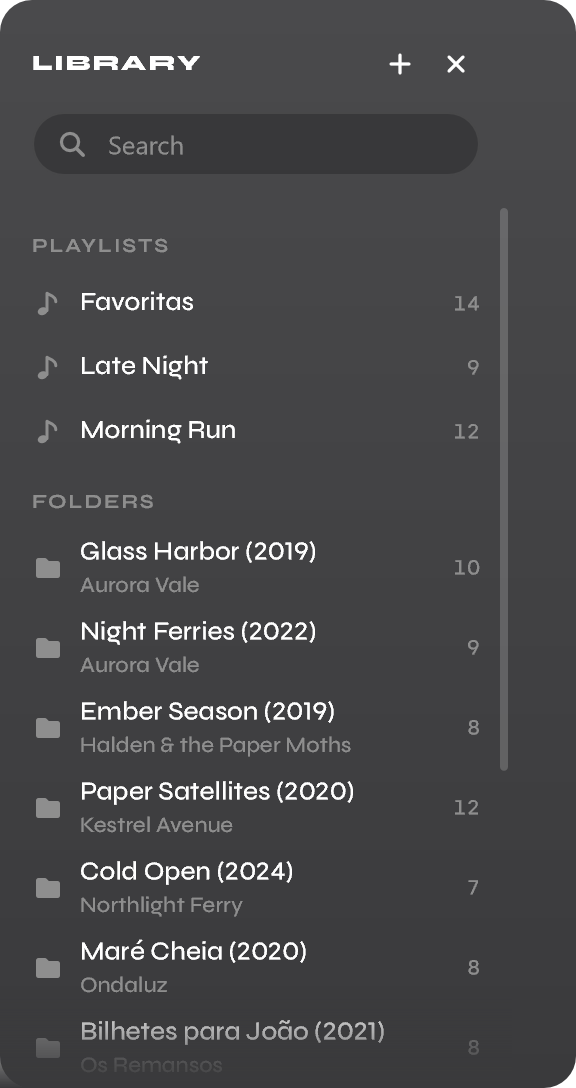
What it does
A player that stays out of the way, and is worth a look when you glance at it.
A visualizer that fills the window
A ring, columns, a wave or a scope, drawn from what you hear at the moment you hear it — or the album's cover, or a picture of your own, drifting slowly.
Your folders, read once
Talerus reads your folders in the background and watches them after. Playlists are plain .m3u8 files other players open, and the search runs as you type, over the whole library.
An equalizer you drag
Ten bands on a curve, and ten presets that glide into place.
Albums as they were made
Gapless, track into track, the silence every encoder adds trimmed away; and a crossfade, if you want one.
At home in Windows
Windows' media controls, the keyboard's media keys, the tray and the taskbar's buttons. It starts with Windows and waits in the tray.
Yours to arrange
Ten themes, Windows' accent or a colour you pick, and three kinds of glass. Docked against the screen's edge, turned to face the half you drop it on, or folded into one column.
What it refuses to do
What Talerus will not do is what it is.
- No account, and nothing sent on its own. The one request Talerus makes by itself is a daily update check, which you can switch off. A report goes only when you write one and have seen all of it.
- Only your files. No streaming, no store, no lookups: covers and names come from the files and their folders, so no service learns what you listen to.
- Your music is only read. Talerus never edits a tag, renames, moves or deletes a file. Point it at any folder — a backup or a network share included.
- At rest, it costs nothing. Paused, it takes no processor time. Playing with the window hidden, only the sound is worked on; the visualizer draws only while it can be seen.
- It never interrupts. It starts in the tray, shows nothing when a track changes, and never takes the focus on its own.
- It never takes the media keys for itself. They reach Talerus through Windows' media session, which gives them to the player in use — never taken from the others.
What it costs
Open all day, it costs about nothing.
Measured on a current desktop: the processor with a library of ten thousand tracks, the memory in a day's use.
Questions
Which formats does it play?
What Windows decodes on its own: MP3, AAC and ALAC (.m4a), FLAC, WAV and WMA. Ogg Vorbis and Opus are not among them: Windows does not decode them everywhere, and they would bring a decoder of Talerus's own.
Do I have to install it?
The download is the program. Run it and it offers to install itself — for you alone, with no administrator, starting with Windows if you want — and then it is in Windows' list of apps, to remove like any other.
Or keep it portable: put an empty file named talerus.portable beside it, and it keeps its settings in that folder and never asks.
Windows warns me about the download.
You will see a blue window titled Windows protected your PC. The button that goes on is behind More info — click it, then Run anyway. Some browsers warn about the file before that, for the same reason.
That screen is Microsoft Defender SmartScreen, and it does not mean Windows found anything wrong in Talerus. It means Windows cannot tell who made it: a publisher proves that by signing their files with a certificate they bought, and Talerus does not have one yet. Every new unsigned program gets this screen, however harmless — the warning is about missing paperwork, not about the file.
You can check the file instead of believing the message. Each release publishes a fingerprint of its download beside it, in SHA256SUMS, and Get-FileHash in PowerShell shows the same fingerprint for a file that arrived whole.
Does Talerus send anything anywhere?
Once a day it asks download.guimadaleno.com whether there is a newer Talerus: one small signed file comes back, and nothing about you goes with the question. Check for updates, in the settings' About, switches it off.
A report goes only when you write one in Report…, read everything it will carry, and press Send. After a crash, Talerus offers one the next time it starts, and still sends nothing until you do.
How does it update itself?
An installed or portable copy checks once a day and puts the new version beside itself, ready for the next start — or at once, with Restart in About. A new version is believed only when it is signed with Talerus's own key, so a server serving something else cannot replace it.
And macOS, or Linux?
Later. Talerus is made for Windows 10 and 11 first, so that it is used, polished and fixed on one system before it is carried to two more.